Notion AI Review: Does It Actually Save Time or Just Add Complexity?
We spent three months managing real client projects with Notion AI Business. Here’s the unfiltered verdict – what works, what doesn’t, and which plan you actually need.
Last updated: June 2026
Notion AI is worth it for freelancers juggling multiple clients. The Business plan at $20/month gives you unlimited AI writing, client management, and project tracking – effectively replacing 3 – 4 separate tools and paying for itself in time saved within the first week.
The tab problem nobody talks about
Looking for the best notion ai review for freelancers information? This guide gives you everything you need. We cover the top choices for notion ai review for freelancers based on real testing, so you can pick the right option with confidence.
This guide covers everything about notion ai review freelancers. Whether you are comparing options or looking for a detailed review, we break down the best notion ai review freelancers options so you can decide with confidence.
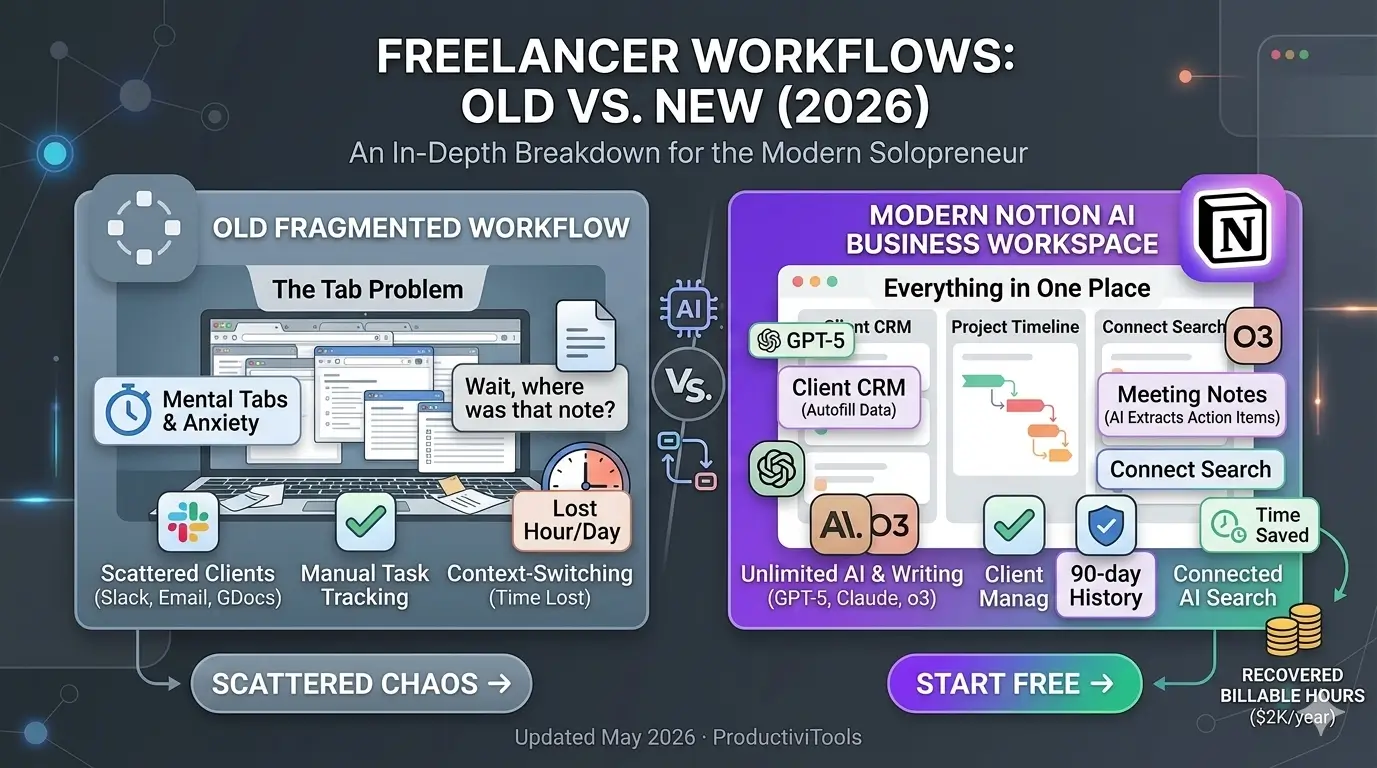
It started as just a few tabs. A Google Doc for meeting notes. A Trello board for project deadlines. A spreadsheet for invoices. A Slack thread with one client, an email chain with another. A notes app for “quick things” that I’d never find again.
By the time I had four active clients, I had a tab problem. Not just browser tabs – mental tabs. I’d jump from a half-finished proposal to a client email to a deadline tracker to a file buried on my desktop, and by the time I got back to the proposal I’d completely lost my train of thought. The context-switching alone was costing me an hour a day, minimum.
One afternoon I spent 25 minutes searching for notes from a client call that had happened two weeks earlier. I found them eventually – in a document I’d titled “notes” inside a folder called “stuff” on my desktop. Not my finest moment.
The worst part wasn’t the wasted time. It was the low-level anxiety that something was always slipping through the cracks. A deadline I might have missed. A deliverable I said I’d send. A feedback point the client mentioned once and I never wrote down properly.
What happens when everything lives in one place
Three months into using Notion AI Business as my main workspace, things look pretty different. All my client work – meeting notes, project timelines, deliverables, briefs, follow-up tasks – is in one searchable place. When I can’t remember what I agreed to deliver to a client last month, I ask the AI and it finds the answer in seconds. When I take notes on a call, AI pulls out the action items and formats them into a task list before I’ve even closed the window.
The scattered feeling went away. Not because I became more organized as a person – I didn’t – but because the system is organized, and the AI does the heavy lifting of keeping it that way.
That’s the promise of Notion AI. This review covers whether it actually delivers – how it works, what it’s genuinely good at, where it breaks down, and which plan makes sense for your situation. No filler, no vague praise.
Notion AI
Best for Multi-Client Freelancers
What’s Good
- All-in-one workspace – notes, tasks, CRM, docs
- Generous free tier with unlimited pages
- Multiple AI models: GPT-5 + Claude Opus 4.1 + o3
- AI search across your entire workspace history
- Excellent for multi-client project management
What’s Not
- Real setup time required – not plug-and-play
- Business plan needed for unlimited AI
- Can feel overwhelming for simple use cases
- AI quality depends on how structured your pages are
$0/mo
$10/mo
$20/mo
How Notion AI actually works: Notion AI review for freelancers
Notion started as an all-in-one workspace – notes, wikis, databases, and project management in one place. By 2026 it’s crossed 100 million users, which tells you it solved a real problem. The AI layer isn’t bolted on as an afterthought. It’s built into the same environment where your actual work lives.
Anywhere you’re writing in Notion, press the space bar or type /AI to open the assistant. It reads the context already on your page – the text, the database fields, the headings – and uses all of it to give you relevant output. You’re not pasting content into a separate chat window. The AI is reading what you’ve already built.
On the Business plan, it runs on GPT-5, Claude Opus 4.1, and o3, with Notion routing requests to the most appropriate model for the task. The feature that really separates it from a standalone AI tool is connected search – ask it “What did I agree to deliver to Client X by the end of this month?” and it searches across your entire workspace history to find a coherent answer. For freelancers with months of client records in Notion, this alone is worth the subscription.
The six AI features that actually save time
Feature lists are easy to write. These six are the ones that get used every single day and have the most direct impact on billable hours recovered:
What Notion AI can do
Business Plan – Unlimited
Jot down 5 key ideas, hit AI, get a full structured draft in seconds.
Paste raw meeting transcript – AI outputs a clean summary with key decisions.
From any page, AI identifies tasks, assigns them, and formats them as a checklist.
Connected AI search finds information from any page, database, or note you’ve ever written.
AI reads your page content and populates status, tags, priority, and custom properties automatically.
Instantly translate pages, client briefs, or deliverables into any major language without leaving Notion.
The database auto-fill was the biggest surprise. A “Client Projects” database with fields like Status, Priority, Next Action, and Estimated Hours can be populated by the AI just from reading the project page. Across five active projects in a week, this saves 20 – 30 minutes of manual data entry. It adds up fast over a month.
Meeting summarization is just as useful in practice. Paste a call transcript into a Notion page and AI generates a clean summary with decisions and action items that can go straight into client-facing notes. Two minutes instead of fifteen. Every time.
Pricing – which plan do you actually need?
Let’s be direct, because most reviews get vague here. If you want meaningful AI without hitting limits on a regular day, you need the Business plan. Here’s the complete breakdown:
| Free | Plus | Business | |
|---|---|---|---|
| Monthly Price (annual) | $0 | $10/mo | $20/mo |
| Pages | Unlimited | Unlimited | Unlimited |
| AI Prompts | Limited | Add-on only | Unlimited ✓ |
| AI Models | – | Basic (add-on) | GPT-5, Claude, o3 |
| File Uploads | 5 MB limit | Unlimited | Unlimited |
| Version History | 7 days | 30 days | 90 days |
| Guests | 10 | Unlimited | Unlimited |
| Advanced Workflows | – | – | Included ✓ |
For most active freelancers, the real choice is between Business and Plus. The Plus plan at $10/month is useful – unlimited guests for client collaboration, better file uploads, 30-day version history – but it doesn’t include unlimited AI. Add the AI add-on and you’re already pushing $20 anyway. Go Business from the start and skip the arithmetic.
The Free plan is a legitimate starting point. Unlimited pages, basic collaboration, and limited AI prompts let you explore the tool before committing. If you’re not sure whether Notion will stick in your workflow, start here and upgrade when you hit the limits.
A real freelance week with Notion AI running the show
Here’s what a typical week actually looks like when Notion AI is your operating system, not just a note-taking app:
Freelancer week with Notion AI
From client brief to final delivery – AI at every step
What that workflow eliminates: separate note-taking apps, manual task creation, copying content into ChatGPT and back, and re-reading long briefs every time you need to recall a detail. Everything stays in one place. The AI acts on context that’s already there.
Where Notion AI genuinely delivers
After three months of daily use across multiple active clients, here’s where it consistently holds up – specific observations, not marketing language:
- Context-aware responses: The AI reads your actual page content. Ask it to write a follow-up email and it references the specific project details – not a generic template. This is the biggest differentiator from using a standalone AI tool. The output is relevant because the context is already there.
- Workspace search that works: Connected AI search is the closest thing to having a personal assistant who has read every document you’ve written. Enormously useful when you’re trying to recall what you agreed to six weeks ago across three different clients.
- Admin overhead reduction: Action item extraction, database auto-fill, and meeting summarization collectively save around 45 – 60 minutes per week on pure admin. At a $50/hour rate, that’s over $2,000 of recovered time annually from a $240/year tool.
- Multi-model access without switching apps: Having GPT-5, Claude Opus 4.1, and o3 available without paying separate subscriptions is a real cost saving. You learn quickly which tasks each model handles best.
- Clean client collaboration: Share specific pages with clients without exposing your full workspace. Clients see professional deliverables. Your working notes stay private.
For a broader view of how Notion AI fits into the freelance toolkit, see our roundup of the best AI tools for freelancers in 2026 – we compare it against standalone writing tools, project management software, and other AI assistants across the board.
Where it falls short – being honest
Notion AI has real limitations. These matter if you’re considering a $240/year commitment:
- Setup time is real: Unlike Grammarly, which works instantly from install, Notion requires you to design your workspace first. Budget 2 – 4 hours of initial setup before you see real value. Skipping this step produces mediocre results and frustration, which is where most negative reviews come from.
- AI quality depends on page structure: Messy, unstructured pages produce generic AI outputs. The more organized your workspace, the better the AI performs. New users often find early results disappointing – this is almost always a structure problem, not an AI problem.
- Business plan required for daily AI use: The Free plan’s AI limits are low enough that you’ll hit them quickly once you’re using it for every meeting summary and draft. The jump to $20/month is worth it, but it’s a real cost to factor in.
- Not a standalone content creation tool: Notion AI is not the right choice for long-form content from scratch, open-ended research, or creative brainstorming sessions that need extended back-and-forth. It shines when working on existing workspace data.
- Mobile experience is functional, not great: Complex database management and AI interactions are still better on desktop. The mobile app has improved, but it’s not where you want to be doing heavy work.
If content SEO is part of your freelance work, our Surfer SEO review is worth reading – it pairs naturally with Notion as a research and optimization layer for content deliverables.
Notion AI vs just using chatGPT separately
This is the question most freelancers ask before committing to the Business plan. The honest answer is that they serve different purposes, and a direct comparison misses the point.
ChatGPT as a standalone app is better for open-ended conversations, complex reasoning, web research, coding help, and anything requiring extended back-and-forth dialogue. It’s a general-purpose AI assistant and excellent at that job.
Notion AI is better for tasks that require context from your existing workspace. Summarizing your specific meeting notes. Extracting action items from your project page. Auto-filling fields in your client database. The difference is context. Notion AI knows what’s in your workspace and acts on it directly – no copying and pasting between apps.
For most freelancers, the ideal setup is Notion AI Business for workspace-integrated tasks, with the Business plan’s multi-model access (GPT-5, Claude Opus 4.1, o3) covering most standalone AI needs too. You probably won’t need a separate ChatGPT Pro subscription for the majority of your daily work. That’s a real cost saving worth factoring in when you’re comparing prices.
Which plan is actually right for you?
Which plan is right for you?
Match your situation to the right tier – no upsell, just honest guidance.
- Managing 3+ active clients
- Using AI daily for drafts and notes
- Want one tool for everything
- Need 90-day version history
- Collaborate with clients regularly
- Solo projects, 1 – 2 clients
- Light or occasional AI use
- Need unlimited file uploads
- 30-day history is enough
- OK paying AI add-on if needed
- Just getting started freelancing
- Personal projects only
- Evaluating whether Notion fits you
- File sizes under 5 MB per upload
- Low AI usage for now
Honest take: if you’re a freelancer with more than two active clients, Business at $20/month is one of the most cost-efficient tools you can buy. You’re getting project management, client tracking, a note-taking system, and unlimited access to three frontier AI models in one subscription. The time savings alone – conservatively 45 minutes a week – justify the cost at any reasonable hourly rate.
If you’re just starting out or only have one client, begin with Free. It’s genuinely useful and will give you a clear sense of whether you’ll use Notion heavily enough to warrant upgrading. You’ll know within two weeks.
FAQ – Notion AI for freelancers
Frequently asked questions
Why is notion ai review for freelancers important for freelancers?
Understanding notion ai review for freelancers is essential for staying competitive. The best notion ai review for freelancers options in 2026 help freelancers save time, impress clients, and grow their income without working more hours.
How to get started with notion ai review for freelancers?
Getting started with notion ai review for freelancers is easier than most freelancers think. Start with a free trial of the top notion ai review for freelancers options, test for one week, and upgrade only if it genuinely saves you time and impresses clients.
What do experts say about notion ai review for freelancers?
Most productivity experts agree that notion ai review for freelancers is a worthwhile investment for serious freelancers. The right notion ai review for freelancers choice can add hours back to your week and significantly improve client satisfaction.
What is the best notion ai review for freelancers?
The best notion ai review for freelancers in 2026 combines ease of use, solid features, and fair pricing. After testing multiple options, the top picks for notion ai review for freelancers stand out for freelancers who need reliability without complexity.
How do I find the right notion ai review for freelancers?
Finding the right notion ai review for freelancers starts with identifying your core needs. The best notion ai review for freelancers options offer free trials, so you can test before committing. Look for notion ai review for freelancers tools with strong user reviews and responsive support.
Is investing in notion ai review for freelancers worth it?
Yes, finding a quality notion ai review for freelancers is absolutely worth it. The right notion ai review for freelancers saves freelancers hours every week and helps maintain a professional image with clients. Top notion ai review for freelancers options typically pay for themselves within the first month.
What makes a good notion ai review freelancers?
A good notion ai review freelancers should be easy to use, affordable, and reliable. The best notion ai review freelancers options in 2026 offer strong integrations and excellent support for freelancers.
How to choose the right notion ai review freelancers?
Choosing the right notion ai review freelancers starts with your workflow needs. Look for notion ai review freelancers tools that offer a free trial so you can test before committing. The top notion ai review freelancers picks on this list all have free tiers.
Is notion ai review freelancers worth the investment?
Yes, finding the best notion ai review freelancers is worth the investment. Top notion ai review freelancers tools save freelancers 5+ hours per week, which quickly pays for itself in client hours recovered.
Final verdict
Notion AI business – strongly recommended for active freelancers
After three months of daily use, Notion AI Business has earned a permanent spot in the freelance toolkit. The combination of a world-class workspace with unlimited access to GPT-5, Claude Opus 4.1, and o3 at $20/month is hard to beat at that price. The AI features solve real problems freelancers face every day: processing client briefs, capturing meeting decisions, drafting deliverables, and stopping things from falling through the cracks.
The honest caveat: Notion rewards what you put in. Take the time to structure your workspace well and the AI multiplies your output significantly. Open it and expect magic without setup and you’ll be underwhelmed. For freelancers willing to invest a few hours upfront, the ongoing return is exceptional.
Bottom line: Start free, spend a week building your workspace structure, then upgrade to Business when you hit the AI limits. You’ll hit them quickly once you see what’s possible.